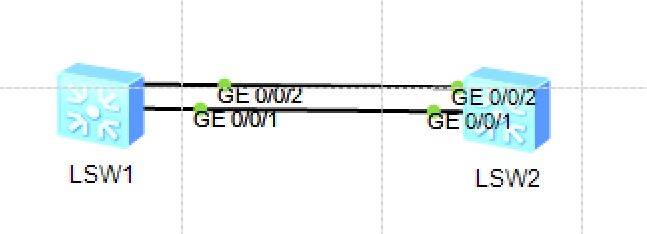
[sw1]dis eth-trunk 1 Eth-Trunk1's state information is: WorkingMode: NORMAL Hash arithmetic: According to SIP-XOR-DIP Least Active-linknumber: 1 Max Bandwidth-affected-linknumber: 8 Operate status: up Number Of Up Port In Trunk: 2 ------------------------------------------------------------------------------ PortName Status Weight GigabitEthernet0/0/1 Up 1 GigabitEthernet0/0/2 Up 1
1 2 3 4 5 6 7 8 9 10 11 12 13 14 15 16 17 18
[sw1]display interface Eth-Trunk 1
Eth-Trunk1 current state : UP
Line protocol current state : UP
Description:
Switch Port, PVID :    1, Hash arithmetic : According to SIP-XOR-DIP,Maximal BW:
 2G, Current BW: 2G, The Maximum Frame Length is 9216
IP Sending Frames' Format is PKTFMT_ETHNT_2, Hardware address is 4c1f-cc25-7bf7
Current system time: 2026-07-07 19:38:48-08:00
    Input bandwidth utilization  :    0%
    Output bandwidth utilization :    0%
-----------------------------------------------------
PortName                      Status      Weight
-----------------------------------------------------
GigabitEthernet0/0/1          UP          1
GigabitEthernet0/0/2          UP          1
-----------------------------------------------------
The Number of Ports in Trunk : 2
The Number of UP Ports in Trunk : 2